AI apps & custom software · Torquay, working across the UK

Custom AI apps for businesses, built around how you work

Most businesses lose hours every week to the same jobs: chasing leads, writing reports, onboarding clients, keeping track of work. I build apps that take that work off your hands — with AI where it helps, and you in charge where it matters.

20-minute call · no obligation · prices by enquiry

Five apps I’ve built

The best proof of what I can build for you is what I’ve already built. Four of these run my own business; the fifth is a complete job system for maintenance teams. Click any screenshot to see it full size.

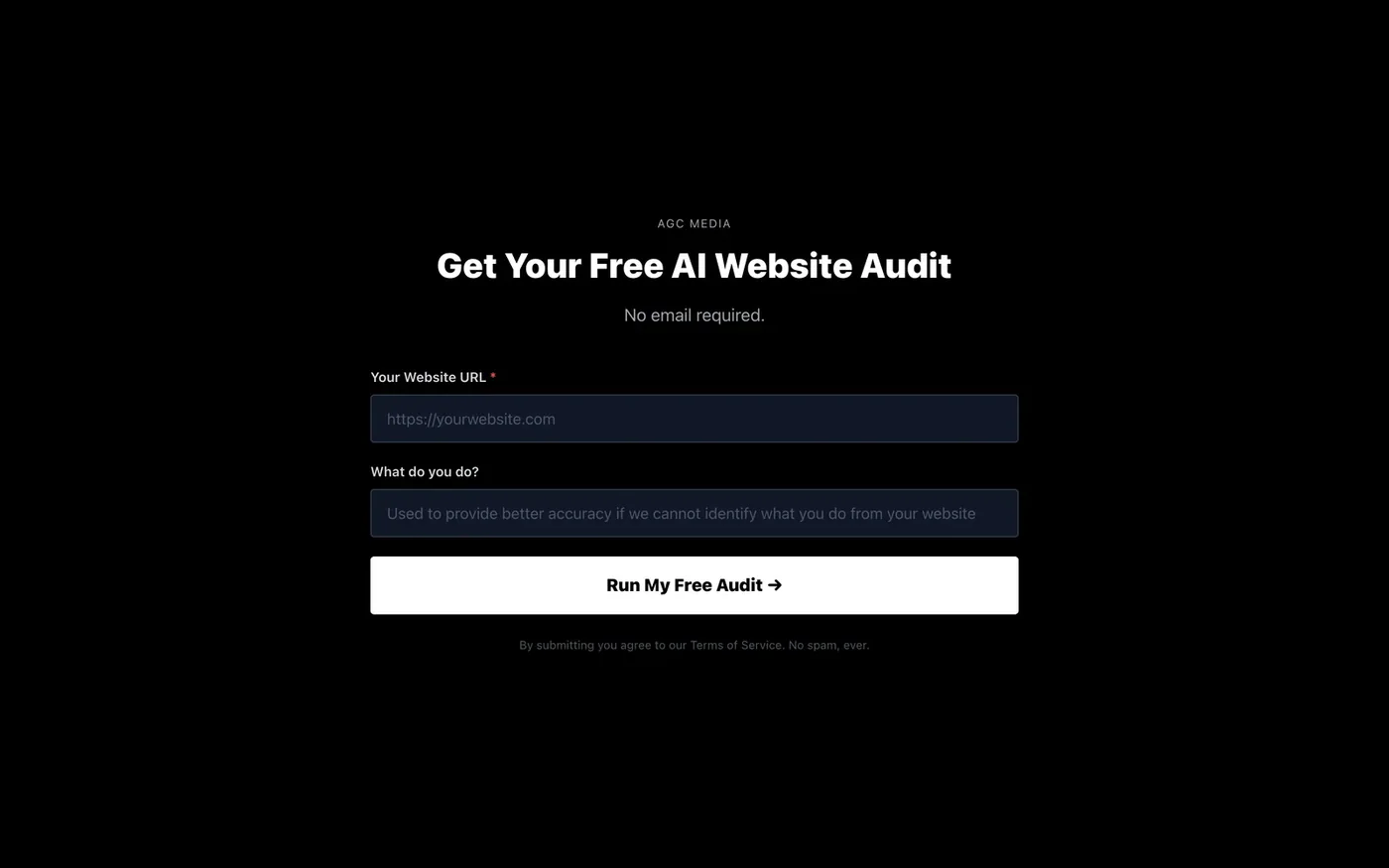
The AI free website audit start screen: paste your web address and run the audit
Start screen — just a web address.
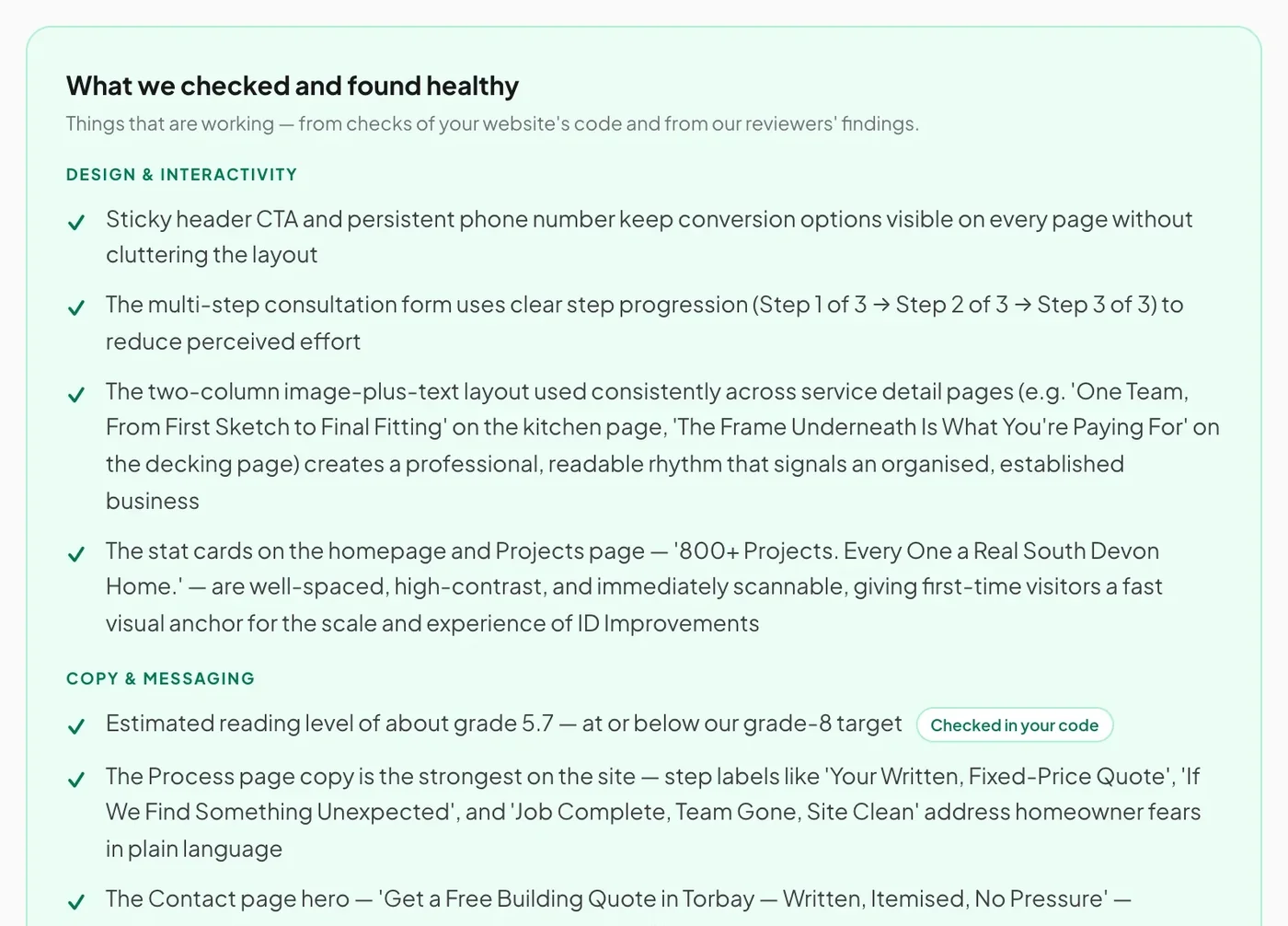
A section of an audit report listing what was checked and found healthy, with items read from the site’s code marked as checked in your code
Part of a real report: what it checked and found healthy.

01 · AI website audit

A free audit that scores any website in about ten minutes

Paste in a web address and it scores the site out of 100 for design, copy, SEO, trust and mobile — with a plain-English fix for each major problem.

  • Opens your homepage and up to 13 key pages in a real browser, including a phone-sized view.
  • Reads your site’s code for hard facts — page titles, search descriptions, structured data, broken links, HTTPS — and speed-tests your homepage with Google Lighthouse.
  • AI reviewers grade each finding against a written rulebook, checked against those facts, with screenshots of the biggest problems.
  • It tells you what it didn’t check, too, so nothing is dressed up.
Try it on your site →

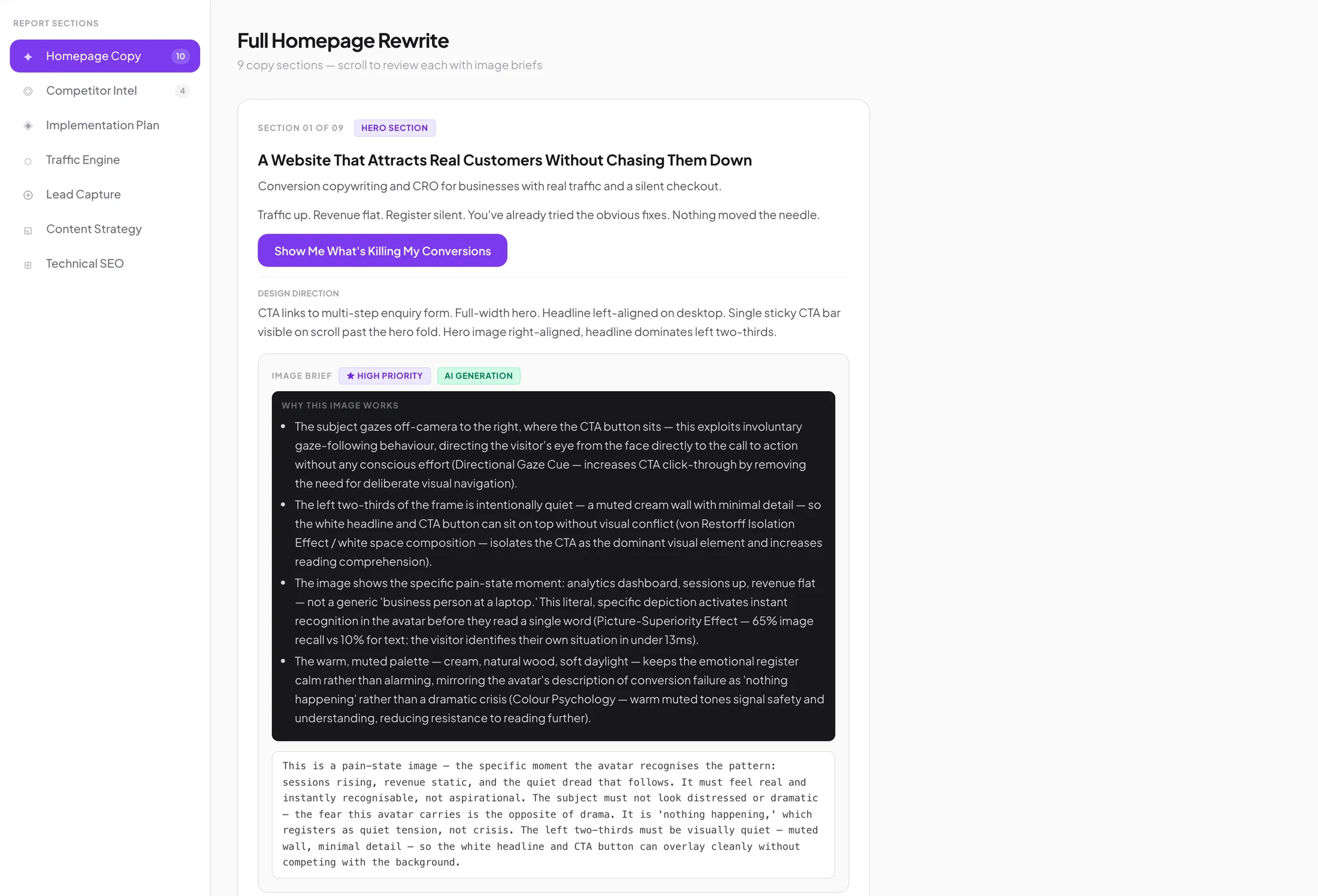
Inside a Conversion Blueprint: a full homepage rewrite, section by section, with design direction and image briefs
A Conversion Blueprint, open at the homepage rewrite.

02 · AI research and writing

The Conversion Blueprint engine

It reads hundreds of public conversations, reviews and comments about a market, works out what buyers worry about and want, then drafts the words to sell to them.

  • Reviews up to five competitors: what they promise, what they charge, where they’re weak.
  • Drafts a new homepage in nine sections, plus Google Ads copy, follow-up emails and a 30-day plan.
  • Everything is written from a buyer profile built from the research — not from guesswork.

Every draft is checked and personalised before it goes to a client.

See the Conversion Blueprint →

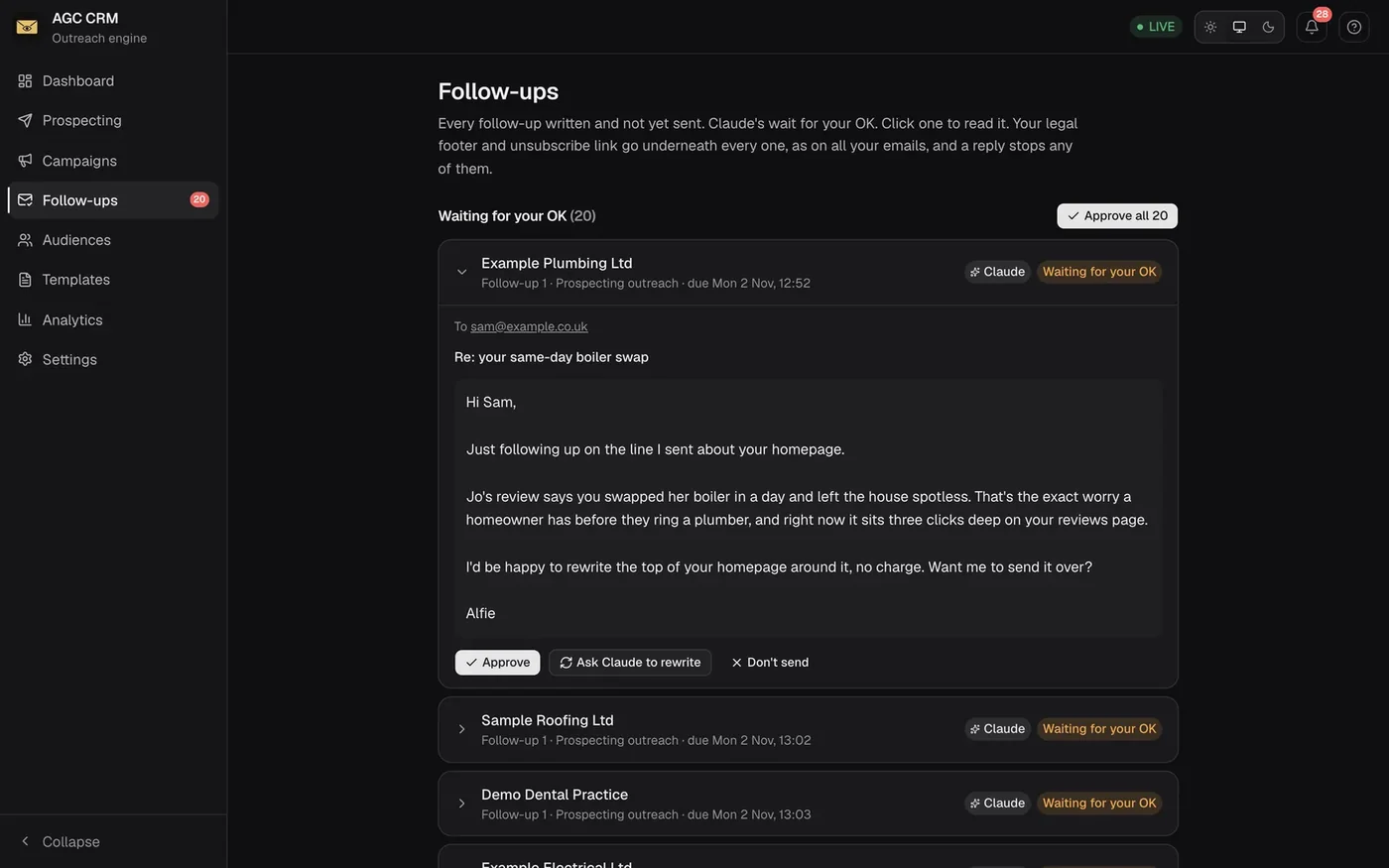
The AGC CRM follow-ups screen: follow-up emails drafted by Claude, each waiting for approval with Approve, Ask Claude to rewrite and Don’t send buttons
Follow-ups drafted by Claude, waiting for an OK. Sample data.
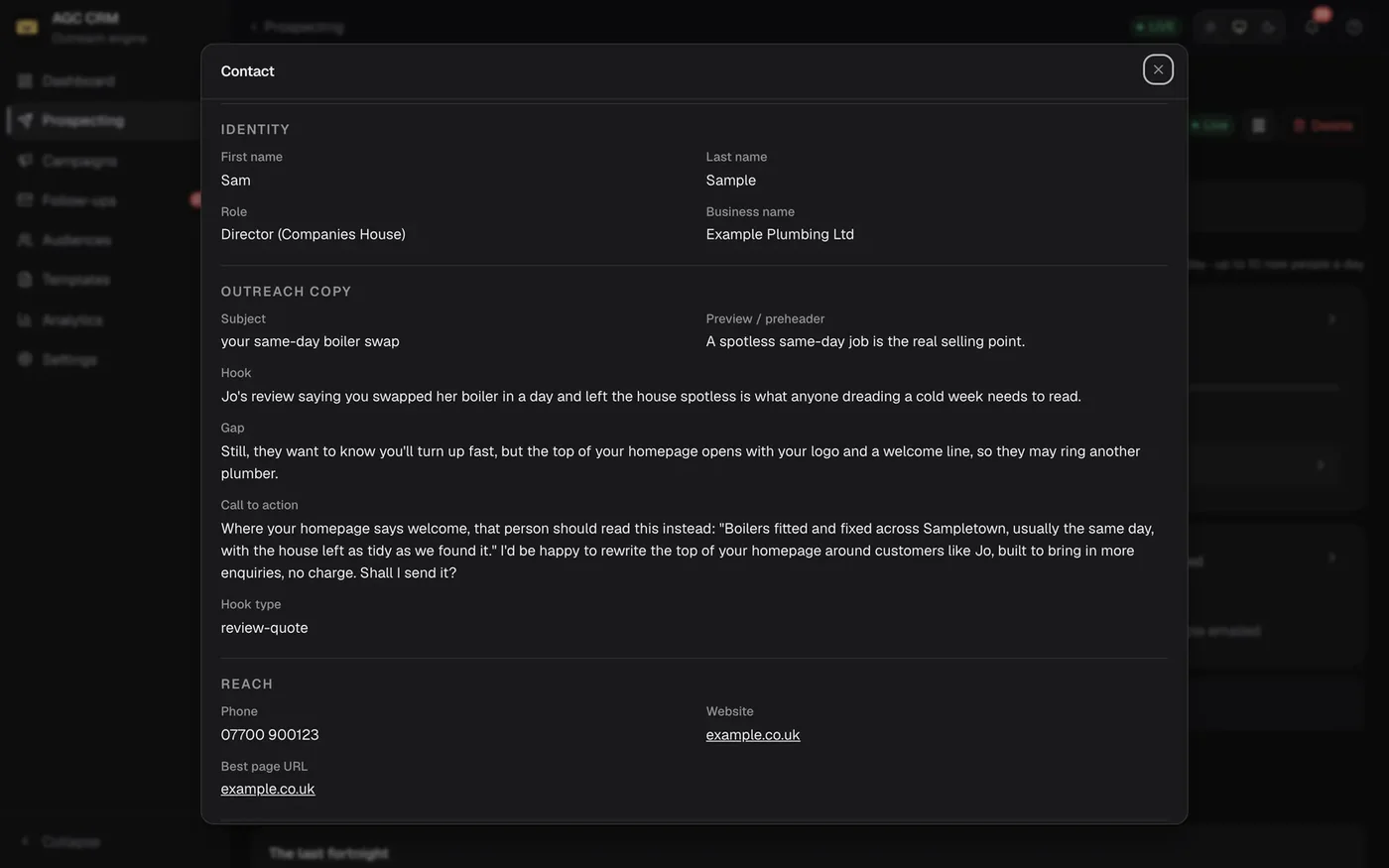
A lead’s research card in the AGC CRM: the business, its director from Companies House, and the hook and offer for the first email
The research behind one email. Sample data.

03 · CRM and outreach

A CRM where AI writes the follow-ups and you press send

My own outreach system. It sends personal emails at a safe daily pace, has Claude draft each follow-up for that one person, and stops chasing as soon as someone replies.

  • Every follow-up waits for approval: Approve, Ask Claude to rewrite or Don’t send.
  • Checks the inbox every ten minutes — replies stop the sequence, bounces are blocked, out-of-office robots are ignored.
  • Checks each business against Companies House before anything is sent.
  • Safety built in: unsubscribe links on every email, a never-contact list, and an automatic stop if bounces spike.
  • A phone layout with alerts, so replies reach you wherever you are.
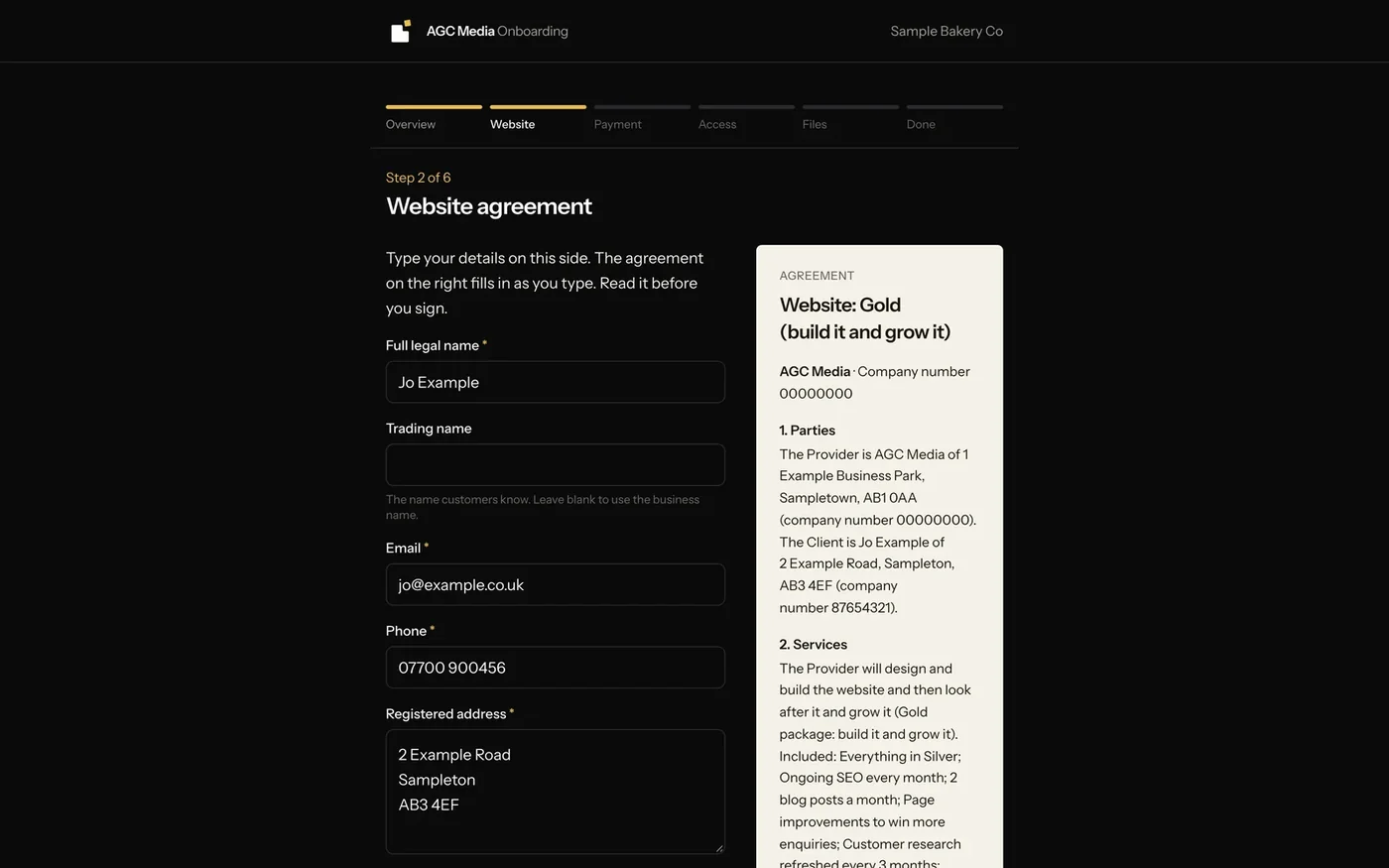
The client onboarding app: the client types their details and the agreement beside it fills in as they type
The agreement fills in as the client types. Sample data.
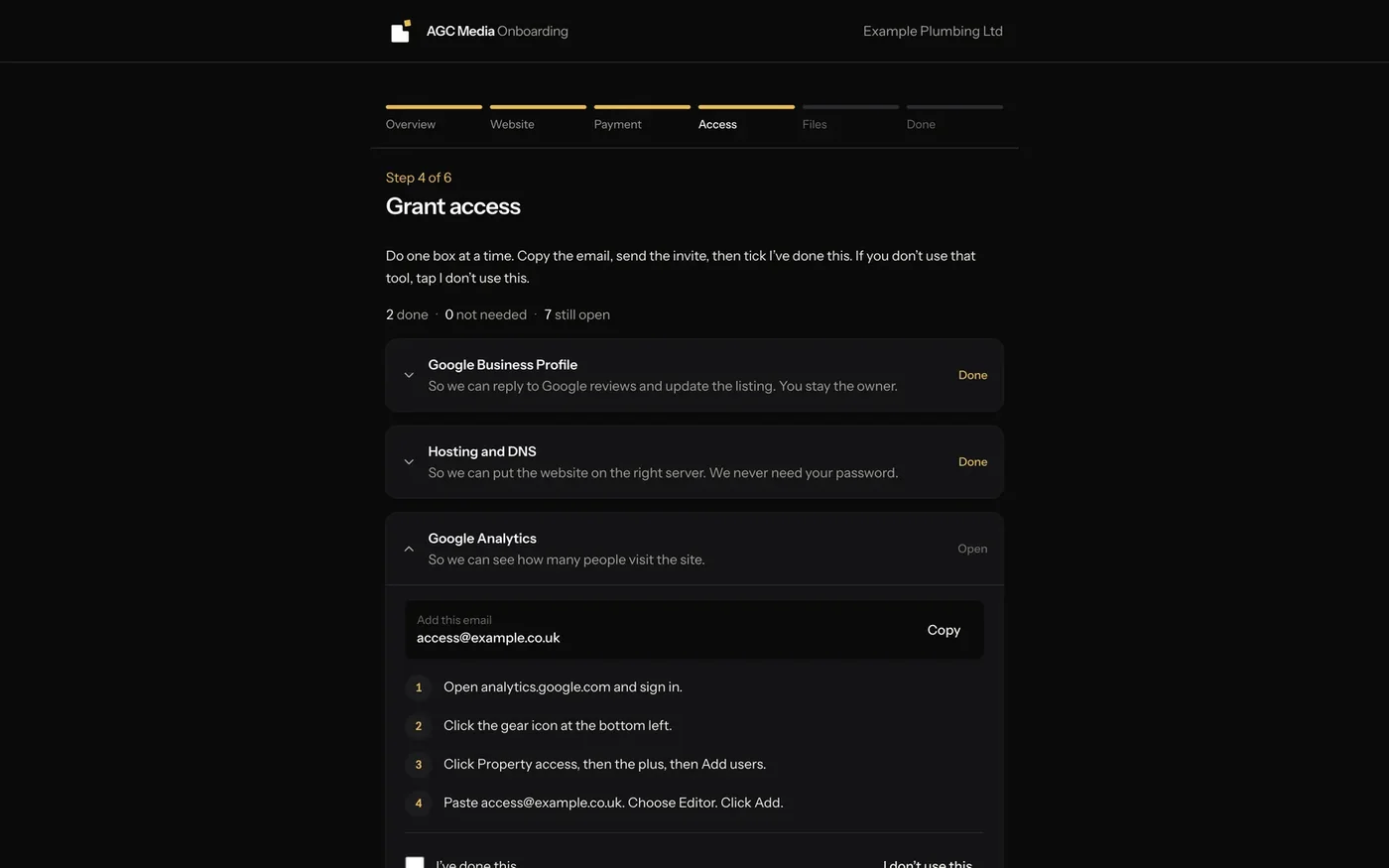
The onboarding access checklist: one box per tool, each with a copy button for the access email and numbered step-by-step instructions
Giving access, one tool at a time — no passwords sent. Sample data.

04 · Client onboarding

Onboarding a new client from one private link

Built for my own client onboarding: one link, about ten minutes, and nobody ever has to send a password.

  • The client reads and signs their agreement on screen — it fills in as they type.
  • A checklist walks them through giving access to Google, their website, hosting and more, step by step.
  • They send their logos and photos straight from the same page.
  • Everything is filed automatically into the client’s own folders, and I see who’s signed on one screen.

05 · Field operations

Field Ops: jobs, tickets and safety reports in one place

Built for operation and maintenance companies with people out on site. The office sees every job and exactly who it’s waiting on; engineers get a phone app that keeps working with no signal.

  • Every planned visit, reactive job, hazard and near miss in one list, with clear ownership and reminders to whoever it’s waiting on.
  • An offline phone app for engineers: their day’s jobs, photos, forms and signatures, syncing when signal returns.
  • Report and form templates built in the app — a failed check raises a ticket to the right department by itself.
  • Finished reports filed to SharePoint as a Word document, a PDF and every photo.
  • A planned-maintenance schedule, dashboards each person can arrange, and each company’s data walled off from every other.

Why it matters

When jobs live in spreadsheets, emails and people’s memories, they get lost between the site and the office. One system everyone can see — that still works in a field with no signal — closes that gap.

How a build works

01A 20-minute call

You tell me what eats your week. I tell you honestly whether an app is the answer — sometimes it isn’t.

02Map how the work really happens

Before any building, we walk through the job as it’s done today — who does what, where it gets stuck, where time disappears.

03Build it, and you see it early

You get a working version to try as soon as possible, not a big reveal at the end. AI goes where it saves time; a person stays in charge where it matters.

04Hand it over and keep it running

You get an app your team can actually use, and I stay on hand to support it and add to it.

Questions, answered straight

How much does an AI app cost?

It depends on what it needs to do, so every build is quoted after a short call. You get a fixed price for an agreed scope before anything starts.

Will the AI make mistakes?

It can, which is why I build a person into the steps that matter. In my own CRM, Claude drafts every follow-up but nothing is sent until I’ve approved it.

Is my data safe?

AGC Media is registered with the Information Commissioner’s Office (ZC257621). Every build is scoped around what data it needs and who can see it — Field Ops, for example, walls each company’s data off from every other in the database itself.

Can it work with the tools I already use?

Usually, yes. The apps above connect to things like Microsoft 365, SharePoint, OneDrive, Companies House and Stripe. Tell me what you use on the call.

Do I need to be technical?

No. You know how your business runs; I turn that into something that works. If you can use a phone, you can use what I build.

What would you hand to an app tomorrow?

Tell me about the work that eats your week in a 20-minute call. You’ll leave knowing whether an app would fix it, and roughly what it would take.

Audit My Website Free